
VLOOKUP is one of the most popular and important Excel functions. We use it to quickly look up or compare related lists and sets of data, and to check for errors. If you use VLOOKUP all the time, it’s well worth learning about XLOOKUP. XLOOKUP does everything VLOOKUP can do, plus it is more versatile and reliable than VLOOKUP. Since XLOOKUP overcomes some of the limitations and issues of VLOOKUP looked at in the next section on this page.
In this quick tutorial we compare the different features of VLOOKUP and XLOOKUP. Watch the video now on YouTube —
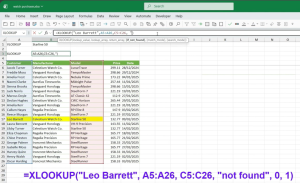
XLOOKUP makes a number of improvements on VLOOKUP. The Key features and advantages of XLOOKUP are:
- Two separate ranges (arrays) are given for the lookup value and the return value – whereas VLOOKUP requires a single, multi-column array, and a column number to find the return value in.
- Option to add a custom value / text if the lookup value is not found – no need to nest it in an IF( ) or IFERROR( ) statement like you do the VLOOKUP, if you want to return a default not-found value instead of the #N/A error message.
- Multiple options are available in Match Mode
- Search Mode gives the option to search from first cell to last or in reverse through the lookup array.
- Advantage #1 You don’t have to specify the column to find the return value in, so XLOOKUP overcomes the problem of VLOOKUP malfunctioning when adding more columns to your data table.
- Advantage #2 You can use both vertical columns and horizontal rows for the lookup arrays – so XLOOKUP combines the functions of both VLOOKUP and HLOOKUP.